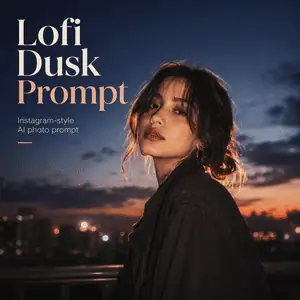
The Lofi Dusk look works best on clear portraits, outdoor photos, street shots, mirror selfies, and profile pictures where the face and body are easy to see.
Copy the Best Lofi Dusk Prompt
Upload your photo first, then paste this prompt into ChatGPT, Gemini, or any AI image editor that supports image editing.
Transform the uploaded photo into a realistic Instagram Lofi Dusk portrait.

Keep the same person, face, hairstyle, outfit, pose, body shape, and facial expression. Do not change the identity.

Create a cinematic dusk and night-time atmosphere with a dark muted background, soft front flash, glowing rim light around the hair and shoulders, warm skin highlights, subtle bloom, shallow depth of field, and fine film grain.

Make the image feel like a viral low-light Instagram portrait shot with a digital camera or DSLR flash. The mood should be dreamy, emotional, stylish, and realistic. Avoid cartoon style, heavy beauty retouching, plastic skin, distorted hands, extra fingers, or changing the face.
Soft Glow Lofi Dusk Prompt
Use this version if you want a calmer, more romantic result.
Edit the uploaded portrait into a soft Lofi Dusk aesthetic. Preserve the same face, identity, pose, outfit, and hairstyle.

Add warm sunset fading into blue-hour tones, gentle glow around the subject, soft flash lighting, dreamy background blur, subtle film grain, and a calm cinematic mood.

Keep the result realistic and natural, like an Instagram photo taken during dusk with soft light and a nostalgic camera texture.
Neon Street Lofi Dusk Prompt
Use this for city photos, street portraits, night walks, café shots, or creator profile pictures.
Turn the uploaded photo into a neon street Lofi Dusk portrait. Keep the same person, face, outfit, pose, and body proportions.

Add a dark urban background, soft neon reflections, blue-hour shadows, glowing streetlights, rim light around the hair and shoulders, subtle front flash, cinematic contrast, shallow depth of field, and fine low-light grain.

Make it look like a realistic viral Instagram night portrait, not digital fantasy art.
Moody Flash Lofi Dusk Prompt
Use this if you want a stronger flash-photo look.
Create a moody Lofi Dusk flash portrait from the uploaded image. Preserve the person’s exact identity, face, hairstyle, outfit, and pose.

Darken the background, add strong white backlight behind the subject, glowing rim light on the silhouette, soft direct flash on the face, warm skin tones, deep shadows, slight bloom, realistic camera grain, and a vintage digital-camera feeling.

The final image should look cinematic, dramatic, and realistic, like a stylish Instagram photo taken at night.
Lofi Dusk Prompt for Profile Pictures
Transform the uploaded selfie into a clean Lofi Dusk profile picture. Keep the same face, expression, hairstyle, and outfit.

Use a dark blurred background, soft dusk lighting, gentle face highlights, subtle rim glow, warm skin tones, light film grain, and a polished Instagram portrait style.

Make the subject stand out clearly. Keep the face sharp and realistic. Do not over-edit the skin or change the identity.
Lofi Dusk Prompt for Reels Covers
Convert the uploaded photo into a scroll-stopping Lofi Dusk Reels cover. Preserve the same person, pose, face, clothing, and expression.

Create a dramatic dusk-night background with strong subject separation, glowing rim light, soft flash, cinematic shadows, warm highlights, subtle grain, and a stylish Instagram aesthetic.

Leave enough clean space around the subject for adding text later. Make the image bold, readable, and realistic at small thumbnail size.
How to Use the Lofi Dusk Prompt
- Choose a clear selfie or portrait.
- Upload it to ChatGPT, Gemini, or another AI image editor.
- Paste one of the Lofi Dusk prompts above.
- Generate the image.
- If the face changes, add: “Preserve the exact same identity and facial features.”
- If the image is too dark, add: “Slightly brighten the face while keeping the dusk mood.”
- If the glow is too strong, add: “Reduce bloom and make the lighting more natural.”
You can also try the effect inside Instagram Stories if the Restyle or Effects option appears on your account. Upload a photo to your Story, open Restyle or Effects, search for Lofi Dusk, and apply the filter. If the filter does not appear, using an AI prompt is the easiest fallback.
Best Photos for the Lofi Dusk Effect
The Lofi Dusk prompt works best with:
- clear selfies
- half-body portraits
- outdoor portraits
- street photos
- simple backgrounds
- natural expressions
- photos where the face is not blurry
- images with enough light for the AI to read facial details
Avoid very dark photos, heavily filtered selfies, low-resolution screenshots, crowded group photos, and images where the face is covered. The clearer the original photo is, the easier it is for AI to keep your identity while changing the mood.
How to Make the Result Look More Realistic
A good Lofi Dusk image should not look like random AI art. It should still look like a believable photo.
Use these extra lines when needed:
Keep realistic skin texture and natural facial details.
Do not make the image look like anime, painting, or fantasy art.
Keep the lighting cinematic but believable.
Do not change the person’s face or body shape.
Avoid over-smoothing, plastic skin, and exaggerated glow.
If the first result is close but not perfect, change only one thing at a time. Ask for a darker background, softer glow, stronger rim light, less grain, or warmer skin tones. Rewriting the whole prompt every time usually makes results less consistent.
Why the Lofi Dusk Look Is Popular
The Lofi Dusk style makes ordinary portraits feel more cinematic without making them look completely fake. It adds contrast, glow, shadow, and nostalgic camera texture while keeping the photo personal.
That is why it works well for Instagram posts, Stories, Reels covers, profile pictures, and aesthetic photo edits. The effect is dramatic enough to stand out, but simple enough for everyday portraits.