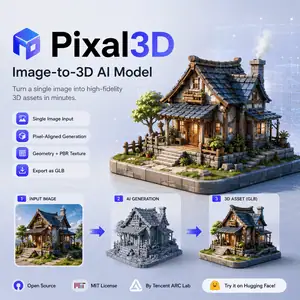
Pixal3D is an image-to-3D model for users who need a 3D asset from a reference image. This guide explains what Pixal3D is, how it works, what it offers, and where it fits in a real 3D workflow.
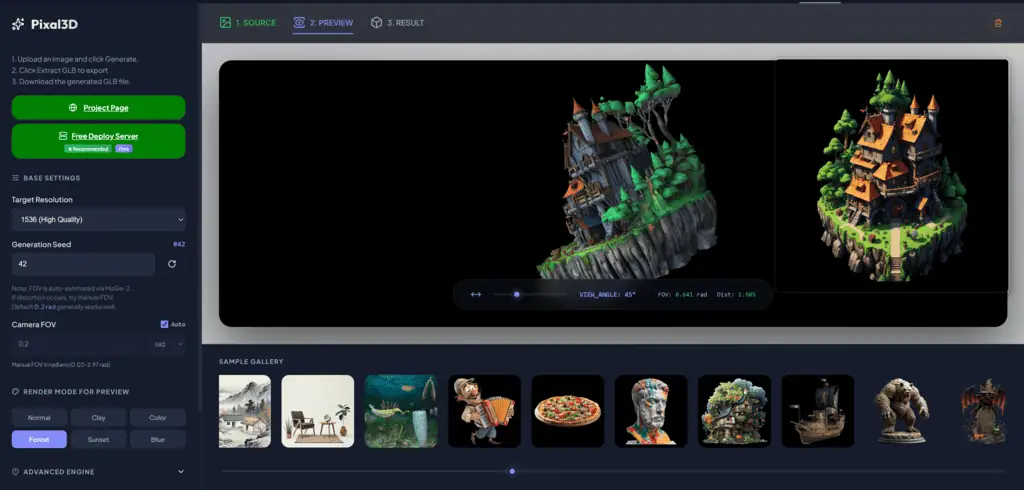
What Is Pixal3D?
Pixal3D is an open-source image-to-3D AI model.
It generates 3D assets from a single image. The project focuses on pixel-aligned 3D generation, which means the model tries to keep the generated shape and texture aligned with the input image.
Pixal3D comes from researchers affiliated with Tsinghua University, Tencent ARC Lab, and Victoria University of Wellington. The paper is listed as a SIGGRAPH 2026 project.
It is not a full 3D editing suite. You still need tools such as Blender, Unity, Unreal Engine, or a 3D asset pipeline to inspect, clean, retopologize, rig, or optimize the output.
Overview
| Item | Details |
|---|---|
| Product name | Pixal3D |
| Type | Image-to-3D generation model |
| Main input | Single image |
| Main output | 3D mesh, including GLB output in the official inference example |
| Source | Research project and open-source repository |
| Main maintainers | TencentARC repository, with authors from Tsinghua University, Tencent ARC Lab, and Victoria University of Wellington |
| Open source | Yes |
| License | MIT License |
| Local use | Yes, through the GitHub repository |
| Training code | Available in the official repository |
| API option | fal.ai lists a Pixal3D endpoint |
| Pricing | Open-source code is free to use under the MIT License. Hosted API or third-party platforms may charge per request. |
Features
Single-Image 3D Generation
Pixal3D can generate a 3D asset from one reference image. This helps artists and developers test an object idea without modeling it from scratch.
Pixel-Aligned Generation
Pixal3D uses pixel back-projection to connect image features with 3D space. This helps the generated asset follow the input image more closely.
Geometry and Texture Output
The project targets both detailed geometry and PBR-style textures. This makes the output more useful for visual review than a plain shape-only mesh.
GLB Export
The official inference example generates a GLB file. GLB works well for previewing, web 3D workflows, game engines, and asset handoff.
Low-VRAM Mode
Pixal3D includes a low-VRAM option for inference. This helps users run the model on machines with tighter GPU memory limits, though speed and resolution may vary.
Training Code
The official repository includes training code and data preparation tools. Researchers can study the method, reproduce experiments, or adapt parts of the pipeline.
Use Cases
Concept Artists Creating 3D Drafts
Concept artists can turn a clean object image into a rough 3D asset. This helps them check volume, silhouette, and camera angles before handing work to a 3D artist.
Game Developers Prototyping Props
Game developers can use Pixal3D to create early prop assets from reference images. The result can support blockouts, mood tests, and internal prototypes.
3D Artists Building a Starting Mesh
3D artists can use Pixal3D output as a starting point. They can then clean topology, improve materials, reduce polygon count, or prepare the mesh for animation.
Ecommerce Teams Testing Product Visualization
Ecommerce teams can test 3D product previews from product-style images. The output may help with early visualization, but production use still needs manual QA.
Researchers Studying Image-to-3D Generation
Researchers can inspect Pixal3D’s pixel-aligned method, training setup, and reconstruction-style design. The open repository makes it useful for comparison and experimentation.
Developers Adding Image-to-3D to Apps
Developers can test Pixal3D locally or through hosted API options. This can support apps for asset generation, 3D previews, creative tools, or internal design automation.
Limitations
Pixal3D still depends on image quality. A clear subject, visible shape, and simple background usually give better results.
The model does not replace a production 3D artist. Generated meshes may need cleanup, retopology, UV checks, material edits, and performance optimization.
You should also check the license terms of any input image, third-party model, or hosted platform before using outputs in commercial work.
Final Thoughts
Pixal3D is a useful image-to-3D model for asset drafts, research, and prototype workflows.
It works best when you treat the result as a starting asset, not a finished production model. For teams that already use 3D tools, Pixal3D can shorten the path from reference image to editable mesh.