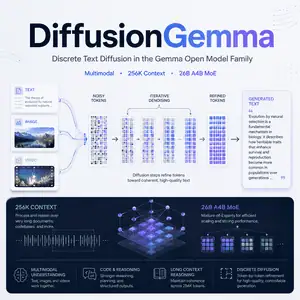
DiffusionGemma brings diffusion-style text generation to the Gemma open model family. This guide explains what it is, how it works, what it supports, and where developers can use it.
What Is DiffusionGemma?
DiffusionGemma is an open-weights generative AI model from Google DeepMind.
It belongs to the Gemma 4 family and uses discrete diffusion to generate text. Instead of writing one token after another, it works on blocks of tokens and refines them through denoising.
The released model is google/diffusiongemma-26B-A4B-it. It uses a 26B A4B Mixture-of-Experts architecture, with 25.2B total parameters and 3.8B active parameters.
DiffusionGemma accepts text and image inputs. It can also process video as frames. It generates text output.
Overview
| Item | Details |
|---|---|
| Model name | DiffusionGemma |
| Official checkpoint | google/diffusiongemma-26B-A4B-it |
| Creator | Google DeepMind |
| Model type | Open-weights multimodal generative model |
| Architecture | 26B A4B Mixture-of-Experts |
| Generation method | Discrete text diffusion |
| Total parameters | 25.2B |
| Active parameters | 3.8B |
| Context length | Up to 256K tokens |
| Canvas length | 256 tokens |
| Inputs | Text, image, video frames |
| Output | Text |
| License | Apache 2.0 |
| Main access point | Hugging Face |
| Inference support | Transformers, vLLM, SGLang, Docker Model Runner |
| Price | Model weights are free to access under the license. Compute costs depend on your hardware or hosting provider. |
Features
Discrete Text Diffusion
DiffusionGemma does not rely on standard token-by-token generation.
It uses a block-autoregressive diffusion process. The model denoises a canvas of tokens in parallel, then moves to the next block.
Fast Low-Batch Inference
The model targets low-latency generation for small batch sizes.
Google’s model card reports speeds above 1100 tokens per second in low-batch H100 FP8 settings. Your result will depend on hardware, precision, batch size, and sampler settings.
26B A4B Mixture-of-Experts Design
DiffusionGemma uses a sparse MoE setup.
It has 128 experts, with 8 active experts plus 1 shared expert. This design lets the model activate a smaller part of the network during inference.
Long Context Support
The model supports context windows up to 256K tokens.
This makes it useful for long documents, codebases, research notes, and multimodal prompts with many inputs.
Multimodal Input
DiffusionGemma handles text and images in the same prompt.
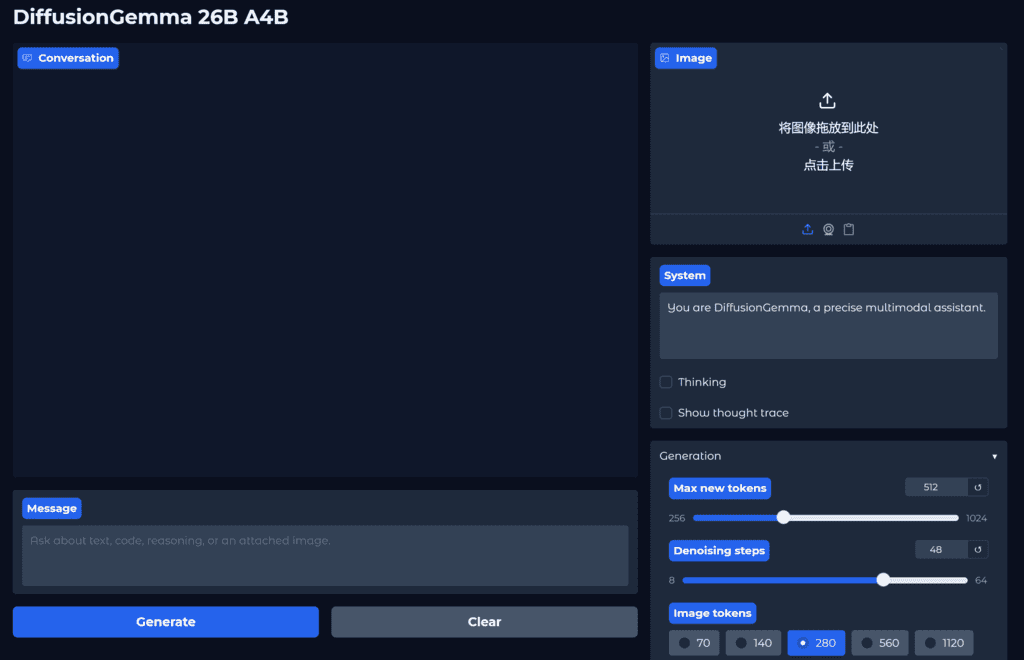
It also processes video by reading frames. For visual tasks, developers can adjust the visual token budget to balance detail and speed.
Image Understanding
The model can work with charts, documents, screenshots, UI images, OCR tasks, and visual question answering.
Use higher image token budgets when the task needs small text, tables, or document details.
Coding and Reasoning
DiffusionGemma supports code generation, code completion, and reasoning tasks.
Its diffusion approach can help with structured generation where the model benefits from revising a block of output before finalizing it.
Function Calling
The model supports structured tool use.
Developers can connect it to agent workflows where the model needs to call tools, read outputs, and continue the task.
Thinking Mode
DiffusionGemma includes configurable thinking mode through the chat template.
Developers should not store prior hidden thought content in multi-turn conversation history. Keep only the final answer from earlier model turns.
Open-Weights Release
Google released the model weights on Hugging Face under Apache 2.0.
Developers can inspect the model card, run it locally with supported libraries, or use quantized versions through compatible runtimes.
Use Cases
Document Parsing for Developers
A developer can use DiffusionGemma to extract information from PDFs, screenshots, receipts, reports, and forms.
The model can read visual content and return structured text, summaries, or answers.
Code Generation for Engineering Teams
An engineering team can use DiffusionGemma for code drafts, refactors, and function-level completion.
The model’s long context window helps when the prompt includes surrounding files, docs, and error logs.
Visual Question Answering for Product Teams
A product team can send UI screenshots and ask the model to describe what appears on screen.
This can support QA notes, accessibility checks, and internal design reviews.
Research Summarization for Analysts
An analyst can give the model long reports and ask for concise summaries.
The 256K context window helps when the source material spans many sections.
Multimodal Chatbots for Builders
A builder can create a chatbot that accepts text and image prompts.
For example, a support bot can read a screenshot from a user and explain the visible error message.
Video Frame Analysis for Media Workflows
A media team can process short videos as frame sequences.
DiffusionGemma can describe scene content, compare frames, or answer questions about visual changes.
Tool-Using Agents for App Developers
An app developer can connect DiffusionGemma to function-calling workflows.
The model can call tools, receive results, and produce structured responses for tasks like data lookup, routing, or report generation.
Limits to Know
DiffusionGemma can still produce incorrect or outdated facts.
It is not a knowledge base. Use retrieval, citations, or a separate verification step when accuracy matters.
Open-ended tasks may need careful prompting. Visual tasks may need a higher image token budget, which increases compute cost.
DiffusionGemma also needs safety checks in production. Developers should add filters, logging, evaluation sets, and human review for sensitive use cases.
How to Try DiffusionGemma
The main checkpoint is available on Hugging Face as google/diffusiongemma-26B-A4B-it.
You can run it with Transformers, serve it through vLLM or SGLang, or explore Docker-based options. Quantized versions may help teams test it on smaller local setups, but quality and speed can vary by quantization.