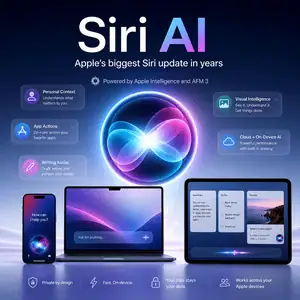
Siri AI is Apple’s biggest Siri update in years.
Apple has turned Siri into a more capable AI assistant with natural conversation, personal context, app actions, web-backed answers, and a dedicated Siri app. The new system runs on Apple Intelligence and the third generation of Apple Foundation Models, also called AFM 3.
What Is Siri AI?
Siri AI is Apple’s new AI assistant for iPhone, iPad, Mac, Apple Watch, Apple Vision Pro, and CarPlay.
It is not a standalone chatbot from a third-party company. Apple built it into Apple Intelligence, its systemwide AI layer for personal context, app actions, writing, visual search, photo editing, and productivity features.
Siri AI can answer open-ended questions, hold back-and-forth conversations, understand your personal context, and take action inside apps.
Apple says Siri AI will come in English later this year. It will start as a beta feature and requires an Apple Intelligence-enabled device.
Overview
| Item | Details |
|---|---|
| Product name | Siri AI |
| Developer | Apple |
| Model family | Apple Foundation Models 3, also called AFM 3 |
| Product type | AI assistant and system feature |
| Main platform | iOS 27, iPadOS 27, macOS 27, watchOS 27, visionOS 27 |
| Open source | No |
| Public model weights | Not released |
| API for developers | App Intents and Foundation Models framework |
| Pricing | Included with supported Apple devices; no separate consumer price announced |
| Main privacy design | On-device processing and Private Cloud Compute |
| Cloud infrastructure | Apple Private Cloud Compute, with Google Cloud and NVIDIA GPUs for the most demanding AFM 3 Cloud Pro workloads |
Features
Natural Conversation
Siri AI can handle open-ended questions and multi-turn conversation.
You can ask for ideas, refine a request, or keep talking without restarting the command each time.
Personal Context
Siri AI can search across your own content when you ask for something specific.
For example, you can ask it to find an old photo, pull up a buried email, or locate a note you saved earlier.
App Actions
Siri AI can act inside apps such as Messages, Music, Reminders, Calendar, Mail, and Photos.
You can ask it to edit a message, add a song to a playlist, create a reminder, add an event, or rotate a photo.
World Knowledge
Siri AI can reference online information for broader questions.
This changes the old Siri pattern. Instead of sending you to a web results page, Siri AI can answer directly and show sources when needed.
Dedicated Siri App
Apple now gives Siri its own app.
The app keeps conversations in one place. You can start on iPhone, continue on iPad, pin useful chats, or open a new thread.
Visual Intelligence
Visual Intelligence lets you ask questions about what you see.
On iPhone, Siri mode inside Camera can identify objects, explain food, or help with tasks based on the scene. On Mac and iPad, you can use screenshots. On Apple Vision Pro, you can ask about real-world objects in view.
Write With Siri
Write with Siri works inside many text fields.
You can ask Siri AI to draft text, rewrite a message, give feedback, or match your tone in Messages and Mail.
Custom Siri Voice
Siri AI lets you adjust voice expressivity and pace.
Apple lists pitch, speed, tone, and accent controls. The complete voice customization experience requires newer high-end devices.
The AFM 3 Models Behind Siri AI
Apple Foundation Models 3 is the model family behind the new Apple Intelligence and Siri AI.
Apple lists five models in this generation.
| Model | Runs on | Main role |
|---|---|---|
| AFM 3 Core | Device | General on-device Apple Intelligence tasks |
| AFM 3 Core Advanced | Device | Apple’s strongest on-device model for multimodal tasks, dictation, and expressive voices |
| AFM 3 Cloud | Private Cloud Compute | Fast and reliable server-side AI tasks |
| ADM 3 Cloud Image | Private Cloud Compute | Image generation, image editing, Genmoji, and Image Playground |
| AFM 3 Cloud Pro | Private Cloud Compute on Google Cloud with NVIDIA GPUs | Complex reasoning and agentic tool use |
How Apple Runs a 20B Model on Device
AFM 3 Core Advanced is the most important model in the new on-device stack.
It has 20 billion parameters, but it does not activate all of them at once. Apple says it activates 1 to 4 billion parameters depending on the request.
The key technique is Instruction-Following Pruning, or IFP.
Standard sparse models often need all expert weights in fast memory. Phones do not have enough DRAM for that. Apple stores the full model in NAND flash and loads only the experts needed for the current prompt into DRAM.
The routing also changes. Instead of choosing experts for every token, Apple makes routing decisions per prompt and only updates them during generation.
This matters because flash storage has more capacity than memory but much lower bandwidth. Apple reduces weight movement so the model can run on consumer hardware without loading the whole 20B model at once.
Why Google and NVIDIA Matter
Apple did not just ship a local model update.
Apple says it worked with Google to build the next generation of Apple Foundation Models. It also worked with Google and NVIDIA to extend Private Cloud Compute to Google Cloud systems using NVIDIA GPUs.
That setup powers the hardest AFM 3 Cloud Pro tasks, including agentic tool use and complex reasoning.
This does not mean Siri AI simply runs as the Google Gemini app. Apple says the system still uses Apple Intelligence, Apple Foundation Models, and Private Cloud Compute privacy controls.
The practical takeaway is simple: Apple keeps the product experience and privacy layer under its control, but it uses Google and NVIDIA infrastructure where Apple’s own cloud stack needs more scale.
Privacy
Apple keeps privacy as the central pitch for Siri AI.
Simple and personal requests can run on device. More complex requests can move to Private Cloud Compute.
Apple says Private Cloud Compute does not store user data, uses data only for the request, and gives researchers a way to verify the privacy model.
For AFM 3 Cloud Pro, Apple extends that system to Google Cloud and NVIDIA GPUs. Apple says it still controls the PCC software, and Apple devices only trust PCC software that Apple has approved cryptographically.
Use Cases
Daily Personal Assistant for iPhone Users
You can ask Siri AI to find photos, summarize plans, locate emails, or help with reminders.
This suits users who already keep their calendar, photos, messages, and notes inside Apple apps.
Hands-Free Help in CarPlay
Drivers can ask Siri AI about messages, locations, reminders, and suggested places without touching the screen.
A useful example is asking which trailhead a friend mentioned in a message, then using that answer for navigation.
Visual Search for Students and Creators
Students can point the camera at a plant, food item, object, or document and ask a question.
Creators can use screenshots on Mac or iPad to inspect visual content, search for related information, or ask Siri to explain what appears on screen.
Writing Support for Messages and Mail
Siri AI can draft replies, polish text, and adjust tone.
This helps users who write emails, messages, notes, and short documents across Apple apps.
App Automation for Power Users
Siri AI works with App Intents and Shortcuts.
You can describe a task in plain language, and the system can connect actions across apps. This makes automation more approachable for users who do not want to build Shortcuts step by step.
Developer Integration for App Teams
App developers can use App Intents schemas so Siri AI understands app content and actions.
Developers can also use the Foundation Models framework to access Apple’s on-device models, cloud models, and other model providers that support Apple’s Language Model protocol.
Device Support
Siri AI requires an Apple Intelligence-enabled device and a supported language.
Apple Intelligence supports iPhone 16 models and later, iPhone 15 Pro, iPhone 15 Pro Max, iPad mini with A17 Pro, iPad models with M1 and later, Mac models with M1 and later, Apple Vision Pro with M2 and later, and supported Apple Watch models when paired with an Apple Intelligence-enabled iPhone.
Some advanced features need newer chips or more memory.
For example, Apple lists full Siri voice customization and improved on-device dictation for iPhone 17 Pro, iPhone 17 Pro Max, iPhone Air, iPad models with M4 and at least 12GB of unified memory, Mac models with M3 and at least 12GB of unified memory, and Apple Vision Pro with M5.
How Siri AI Compares With Old Siri
Old Siri worked best for simple commands.
Siri AI tries to act more like a personal assistant. It can talk, search your context, understand what is on screen, use online information, and take action inside apps.
The upgrade matters because Siri now has a model stack behind it. AFM 3 Core handles lighter on-device work. AFM 3 Core Advanced handles stronger local multimodal tasks. AFM 3 Cloud Pro handles harder cloud reasoning.
This makes Siri AI more ambitious than a voice-command refresh.
Should You Care About Siri AI?
You should care about Siri AI if you use Apple devices every day.
The biggest change is not one flashy feature. It is the combination of personal context, app actions, visual understanding, and privacy-focused cloud processing.
Apple is not trying to make Siri feel like a separate AI website. It is trying to make Siri work inside the apps, files, photos, messages, and devices you already use.
That is the real bet behind Siri AI.