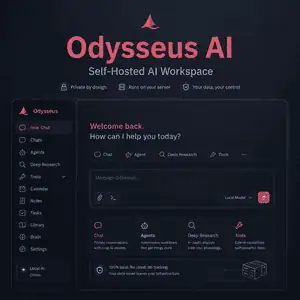
Odysseus AI is a self-hosted AI workspace for people who want a ChatGPT-like interface running on their own hardware. This guide explains what Odysseus AI is, what it can do, who it is for, and where it may be too early or too technical. The facts here are based on the official landing page, GitHub README, security policy, and roadmap checked on June 7, 2026.
Odysseus positions itself as local-first and privacy-first, but local hosting does not automatically remove security risk. You still need to manage authentication, model endpoints, tool access, email permissions, and network exposure. Below, you will find a practical overview, setup notes, limitations, alternatives, and a clear next step.
What Is Odysseus AI?
Odysseus AI is an open-source, self-hosted workspace for using language models through chat, agents, tools, model serving, research, memory, documents, email, and calendar features.
It is not a foundation model. It is closer to a local AI control center that connects to local models, model runners, and optional external APIs.
The project is aimed at users who want more control over their AI environment than a hosted chatbot usually allows.
What Odysseus AI Can Do
Odysseus AI combines several AI workflows that are often split across separate tools.
Its main value is not one single feature, but the attempt to put local chat, agents, research, memory, model management, and productivity tools in one self-hosted interface.
Chat With Local or API Models
Odysseus AI lets users chat with local models or connected API providers.
This makes it useful for people who want to test different models without switching interfaces every time.
A practical use case is running a smaller local model for private notes, then using a stronger API model only when the task needs more reasoning or context.
Run Agents With Tools
Odysseus AI includes agent-style workflows where the assistant can use tools to work through tasks.
This is powerful, but it also increases risk. Tool access should be limited, especially for shell commands, file access, email, calendar, and model-serving controls.
For early testing, start with a small tool set and expand only after you understand how the agent behaves.
Recommend and Serve Local Models
The Cookbook feature is designed to scan hardware and recommend models that fit the machine.
This helps users who do not know which GGUF, FP8, AWQ, or served model setup is realistic for their GPU and RAM.
The practical benefit is simple: instead of guessing which model might run, you can start from hardware-aware recommendations.
Research, Compare, and Write Documents
Odysseus AI includes deep research, model comparison, and document editing features.
Deep research is useful when you want the system to gather sources and synthesize a report. Model comparison is useful when you want to test several models on the same prompt without knowing which one answered first.
The document editor is best used as an assisted writing space, not as a replacement for human editing.
Use Memory, Notes, Email, and Calendar
Odysseus AI includes persistent memory, notes, tasks, email, and calendar integrations.
These features can make a local assistant more useful because it can remember context and act across daily workflows.
They also increase the amount of sensitive data the system can access. Treat these features as privileged, not casual add-ons.
Who Odysseus AI Is For
Odysseus AI is best for technical users who already understand self-hosting, local LLMs, Docker, Python environments, or model runners.
It is a strong fit for:
- Local AI users who want one workspace for chat, agents, research, and model serving
- Developers testing several local and API models
- Privacy-conscious users who prefer running AI on their own machine
- Tinkerers who are comfortable troubleshooting fast-moving open-source software
It is also interesting for users who want a personal AI workspace that can connect to email, calendar, notes, memory, and local tools.
Who Odysseus AI Is Not For
Odysseus AI is not the easiest choice for users who want a polished one-click chatbot.
Avoid it as your first local AI tool if you are not comfortable reading setup logs, editing configuration, or debugging model-serving problems.
It may also be the wrong fit for production business use unless you can isolate it, secure it, test integrations, and manage updates carefully.
For nontechnical users, Open WebUI or AnythingLLM may be easier starting points.
How to Use Odysseus AI in Practice
The safest first use of Odysseus AI is a local-only test on a machine you control.
Do not start by exposing it to the public internet or connecting every sensitive integration.
Start With a Local Docker Test
The official README recommends Docker for a straightforward setup.
A practical first run looks like this:
- Clone the project repository.
- Copy the example environment file.
- Start the Docker Compose stack.
- Open the local web UI after the containers are healthy.
- Create or change the admin credentials immediately.
Keep the default local binding unless you intentionally need network access.
Use Native Setup on Apple Silicon When Needed
On Apple Silicon, the project notes that Docker on macOS cannot use the Metal GPU for acceleration.
If GPU acceleration matters on an M-series Mac, use the native macOS route instead of Docker.
This is a good example of why hardware matters: the best setup path depends on the machine, GPU, model size, and backend.
Connect Models Gradually
Start with one local model or one trusted API provider.
After that, add model runners, search, memory, email, calendar, and tools one at a time.
This makes troubleshooting easier and reduces the chance that a misconfigured integration exposes data or breaks the workspace.
Safety Notes Before You Expose Odysseus AI
Odysseus AI can access sensitive local resources, so it should be treated like an admin console.
Do not run it as a public, unauthenticated service. Keep authentication enabled, use HTTPS when exposing it beyond localhost, and place it behind a trusted reverse proxy, VPN, or private access layer.
Keep databases, local model APIs, search services, ChromaDB, Ollama, vLLM, llama.cpp, and provider tokens internal unless you have a specific reason to expose them.
Be especially careful with shell access, file read/write, email access, MCP servers, model serving, API tokens, memory, and scheduled tasks.
Odysseus AI vs Alternatives
Odysseus AI competes with other self-hosted or local AI tools, but it has a broader personal workspace angle.
| Tool | Best for | Main difference |
|---|---|---|
| Odysseus AI | Local-first AI workspace with chat, agents, research, model serving, memory, email, and calendar | Broader personal workspace, but more experimental |
| Open WebUI | Self-hosted chat interface for local and cloud models | Mature local AI interface with a large community |
| LibreChat | Multi-provider AI chat for individuals and teams | Strong unified chat experience across many providers |
| AnythingLLM | Document chat, RAG, workspaces, and local AI agents | Easier document-centered AI workflow |
Choose Odysseus AI when you want one self-hosted workspace that goes beyond chat.
Choose Open WebUI when you mainly want a strong self-hosted model interface.
Choose LibreChat when your priority is a polished multi-provider chat platform.
Choose AnythingLLM when you want an easier path to document chat, RAG, and workspaces.
Limitations and Risks
Odysseus AI is promising, but it is not a risk-free drop-in replacement for hosted AI products.
The roadmap shows active work around bug fixing, install testing, integration audits, troubleshooting documentation, model-serving reliability, and agent prompt bloat.
That means users should expect rough edges, especially across different operating systems, GPUs, drivers, and local model setups.
At the time of review, the GitHub repository showed no formal releases published, so check the repository before depending on a version number or upgrade path.
Common Mistakes
The most common mistake is confusing Odysseus AI with Odyssey AI, Odyssey ML, or unrelated travel and automation projects.
The second mistake is assuming “local-first” means “secure by default.” Local AI can still expose files, emails, tokens, browser sessions, and private documents if configured carelessly.
Another mistake is giving agents too many tools too early. Start with low-risk actions before enabling shell, file write, email send, or scheduled tasks.
A final mistake is choosing models that do not fit your hardware. A model that barely loads may still be too slow for research, agents, or long-context work.
Recommended Next Step
Use Odysseus AI if you want a hands-on self-hosted AI workspace and you are comfortable managing local infrastructure.
Start with a private local install, connect one model, test chat, then add research, memory, and tools only after the basics work.
For production or team use, compare it with Open WebUI, LibreChat, and AnythingLLM before committing to Odysseus as your main AI workspace.