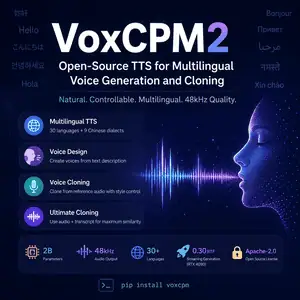
VoxCPM2 is a new open-source text-to-speech model for users who want local voice generation, multilingual speech, and controllable cloning. This guide explains what VoxCPM2 is, what it supports, and where it fits in a real audio workflow.
What Is VoxCPM2?
VoxCPM2 is an open-source text-to-speech model from the VoxCPM team, ModelBest, THUHCSI, and OpenBMB. It generates speech from text, creates voices from written descriptions, and clones voices from reference audio.
The model uses a tokenizer-free diffusion autoregressive architecture. Instead of relying on external discrete speech tokens, it models continuous speech representations. This design targets more natural prosody, richer expression, and better voice detail.
VoxCPM2 has 2B parameters. The team says it trained the model on more than 2 million hours of multilingual speech data. It supports 30 languages, 9 Chinese dialects, and 48kHz audio output through AudioVAE V2.
You can use VoxCPM2 as a local AI voice model, a research project, or a production-ready open-source TTS base. It uses an Apache-2.0 license, so commercial use is allowed, but you still need to handle consent, rights, and safety checks for voice cloning.
Overview
| Item | Details |
|---|---|
| Model type | Text-to-speech and voice cloning model |
| Developer | VoxCPM Team, ModelBest, THUHCSI, OpenBMB |
| Parameters | 2B |
| Architecture | Tokenizer-free diffusion autoregressive TTS |
| Languages | 30 languages plus 9 Chinese dialects |
| Audio output | 48kHz |
| Voice cloning | Yes |
| Voice design | Yes, from text description |
| Open source | Yes |
| License | Apache-2.0 |
| Commercial use | Allowed under the license |
| Local use | Yes |
| Hardware | About 8GB VRAM listed on the model card |
| Install | pip install voxcpm |
Features
Multilingual TTS
VoxCPM2 supports 30 languages, including English, Chinese, Japanese, Korean, Spanish, French, German, Arabic, Hindi, Russian, and Vietnamese. You do not need to add a language tag before the input text.
This helps if you build narration tools, learning apps, game dialogue, or multilingual assistants.
Voice Design from Text
VoxCPM2 can create a new voice from a written prompt. You can describe traits such as gender, age, tone, emotion, and pace.
For example, you can ask for a calm older narrator or a fast cheerful speaker. You do not need reference audio for this mode.
Controllable Voice Cloning
VoxCPM2 can clone a speaker from a short reference audio clip. You can also add style instructions to adjust emotion, pace, or delivery while keeping the speaker’s timbre.
This mode fits prototype voiceovers, character tests, dubbing drafts, and internal audio tools. Get consent before cloning any real person’s voice.
Ultimate Cloning
Ultimate Cloning uses both reference audio and its transcript. The model treats the reference as context and continues the speech with close speaker similarity.
This mode suits cases where voice detail matters more than flexible style control. It also requires cleaner inputs because transcript quality and audio quality affect the result.
48kHz Audio Output
VoxCPM2 accepts 16kHz reference audio and outputs 48kHz audio. The model card says AudioVAE V2 handles the 16kHz-to-48kHz reconstruction.
You still need to test the output in your target environment. Podcast platforms, game engines, web apps, and video editors may compress audio in different ways.
Streaming Generation
VoxCPM2 supports streaming generation. The model card lists real-time factor numbers as low as about 0.30 on an NVIDIA RTX 4090, with faster results through Nano-vLLM.
This matters for interactive products. For batch voiceover work, quality and stability may matter more than latency.
How to Use VoxCPM2
Install the package:
pip install voxcpm
Basic text-to-speech example:
from voxcpm import VoxCPM
import soundfile as sf

model = VoxCPM.from_pretrained("openbmb/VoxCPM2", load_denoiser=False)

wav = model.generate(
    text="VoxCPM2 supports multilingual speech and controllable voice generation.",
    cfg_value=2.0,
    inference_timesteps=10,
)

sf.write("output.wav", wav, model.tts_model.sample_rate)
For voice design, place the voice description at the start of the text:
text = "(A calm middle-aged narrator, warm tone) Welcome to this tutorial."
For cloning, pass a reference audio file:
wav = model.generate(
    text="This is a cloned voice sample.",
    reference_wav_path="speaker.wav",
)
Best Use Cases
VoxCPM2 works best for developers and creators who want an open TTS model they can run, inspect, and adapt. It is a strong fit for audiobooks, game NPC voices, multilingual demos, voice interface prototypes, and research on speech generation.
It is not a one-click hosted voice platform by default. You need Python, GPU setup, audio testing, and a review process for cloned voices.
Limits and Safety Notes
Voice cloning creates legal and ethical risk. Use VoxCPM2 only with permission from the speaker or with voices you have the right to use.
The model may still produce artifacts, wrong pacing, or unstable emotion control in some prompts. Test with your real scripts, target languages, and output devices before you ship anything.