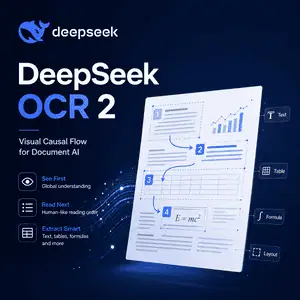
What Is DeepSeek OCR 2?
DeepSeek OCR 2 is an open-source image-to-text and document understanding model from DeepSeek-AI.
It is designed to read documents, screenshots, PDFs, tables, formulas, and complex page layouts more intelligently than traditional OCR systems. Instead of only scanning pixels from left to right, it uses Visual Causal Flow to follow a more logical reading order.
Model Overview
| Item | Details |
|---|---|
| Model name | DeepSeek OCR 2 |
| Developer | DeepSeek-AI |
| Model type | OCR, image-to-text, document understanding, vision-language model |
| Main idea | Visual Causal Flow for human-like visual encoding |
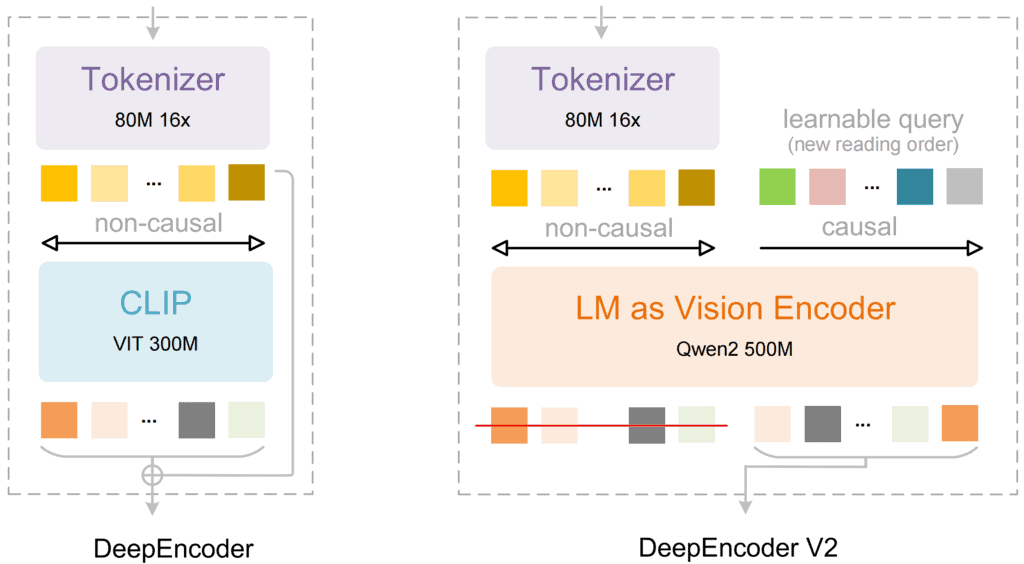
| Core encoder | DeepEncoder V2 |
| Model size | 3B parameters |
| Tensor type | BF16 |
| License | Apache-2.0 |
| Availability | Open-source weights on Hugging Face and code on GitHub |
| Main input | Document images, screenshots, scanned pages, PDFs |
| Main output | Plain text or structured Markdown |
| Inference support | Transformers, vLLM, SGLang, Docker-based workflows |
| Best use cases | Complex OCR, document parsing, Markdown conversion, layout-aware extraction |
| Price | Free model weights; running cost depends on your own GPU or hosting provider |
Features
Visual Causal Flow
DeepSeek OCR 2 introduces Visual Causal Flow, a reading mechanism that reorders visual tokens based on document meaning.
This helps the model handle pages where the natural reading order is not the same as the pixel order.
Better Complex Layout Understanding
The model is built for documents with columns, tables, figures, formulas, and mixed visual structure.
This makes it more useful for research papers, reports, scanned documents, and pages where standard OCR often returns broken text.
Markdown Document Conversion
DeepSeek OCR 2 can convert document images into Markdown using a dedicated prompt.
This is useful when you want clean headings, paragraphs, tables, and formulas instead of raw extracted text.
Plain Text OCR Mode
For simpler tasks, the model also supports plain OCR without layout grounding.
This is useful for quick text extraction from screenshots, scanned notes, and basic document images.
Dynamic Resolution Support
DeepSeek OCR 2 supports dynamic resolution, using multiple 768×768 crops plus a 1024×1024 global view by default.
This helps the model process detailed pages without forcing every image into a single fixed resolution.
Open-Source Deployment
The model is available through Hugging Face and GitHub under the Apache-2.0 license.
Developers can run it locally with Transformers, use vLLM for faster inference, or build OCR tools around the model weights.
FAQ
Is DeepSeek OCR 2 open source?
Yes. DeepSeek OCR 2 is available with model weights and code, and the Hugging Face model page lists the license as Apache-2.0.
What is DeepSeek OCR 2 used for?
It is used for OCR, document parsing, image-to-text conversion, and converting complex document images into structured Markdown.
It is especially useful for PDFs, academic papers, tables, formulas, and multi-column pages.
How is DeepSeek OCR 2 different from traditional OCR?
Traditional OCR usually reads text in a fixed visual order.
DeepSeek OCR 2 tries to understand the logical structure of the page first, then follows a more human-like reading order.
Can DeepSeek OCR 2 convert PDFs to Markdown?
Yes. The official GitHub workflow includes PDF processing, and the model’s main document prompt is designed to convert documents into Markdown.
Does DeepSeek OCR 2 support tables and formulas?
Yes. Its layout-aware design makes it suitable for tables, mathematical formulas, and structured documents.
Results still depend on image quality, layout complexity, and inference settings.
Can I run DeepSeek OCR 2 locally?
Yes. The model can be used with Hugging Face Transformers, and the official repository also provides vLLM inference guidance.
A modern NVIDIA GPU is recommended for practical local inference.
Is DeepSeek OCR 2 free?
The model weights are free to access under an open-source license.
You still need to pay for your own GPU, server, or third-party inference provider if you deploy it at scale.
Is DeepSeek OCR 2 better than DeepSeek OCR?
DeepSeek OCR 2 is the newer version and focuses on Visual Causal Flow, a more advanced approach to reading order and layout understanding.
For complex documents, this is the main reason to choose DeepSeek OCR 2 over the first version.